This site contains affiliate links. We may earn a commission at no extra cost to you. This helps us keep the site running and continue providing free guides and comparisons.
The Bottom Line#
HeyGen is the most polished AI avatar video platform available in 2026, and the clear leader for businesses that need professional video content at scale without cameras or actors. Based on our analysis and user feedback, Avatar IV delivers strikingly realistic results, the video translation with lip-sync is genuinely impressive across 175+ languages, and the workflow from script to finished video takes minutes rather than hours. It is not cheap, but for organizations replacing traditional video production with AI-generated content, the ROI is immediate.
Rating: 4.5/5 | Price: Free / $29 / $49 / $149/month | Last verified: September 2026
Score Breakdown
Key Facts#
- Pricing: Free (3 videos/month), Creator ($29/mo), Pro ($49/mo, 1,000 credits/mo), Business ($149/mo), Enterprise (custom)
- Free tier: Yes, 3 videos per month with watermark, no credit card required
- Platforms: Web, API, iOS, Android
- Latest update: Avatar IV with improved lip-sync, Precision Translation engine, B-roll from Sora 2/Veo 3.1
- Languages: 175+ languages and dialects for video translation
What Is HeyGen and Who Is It For?#
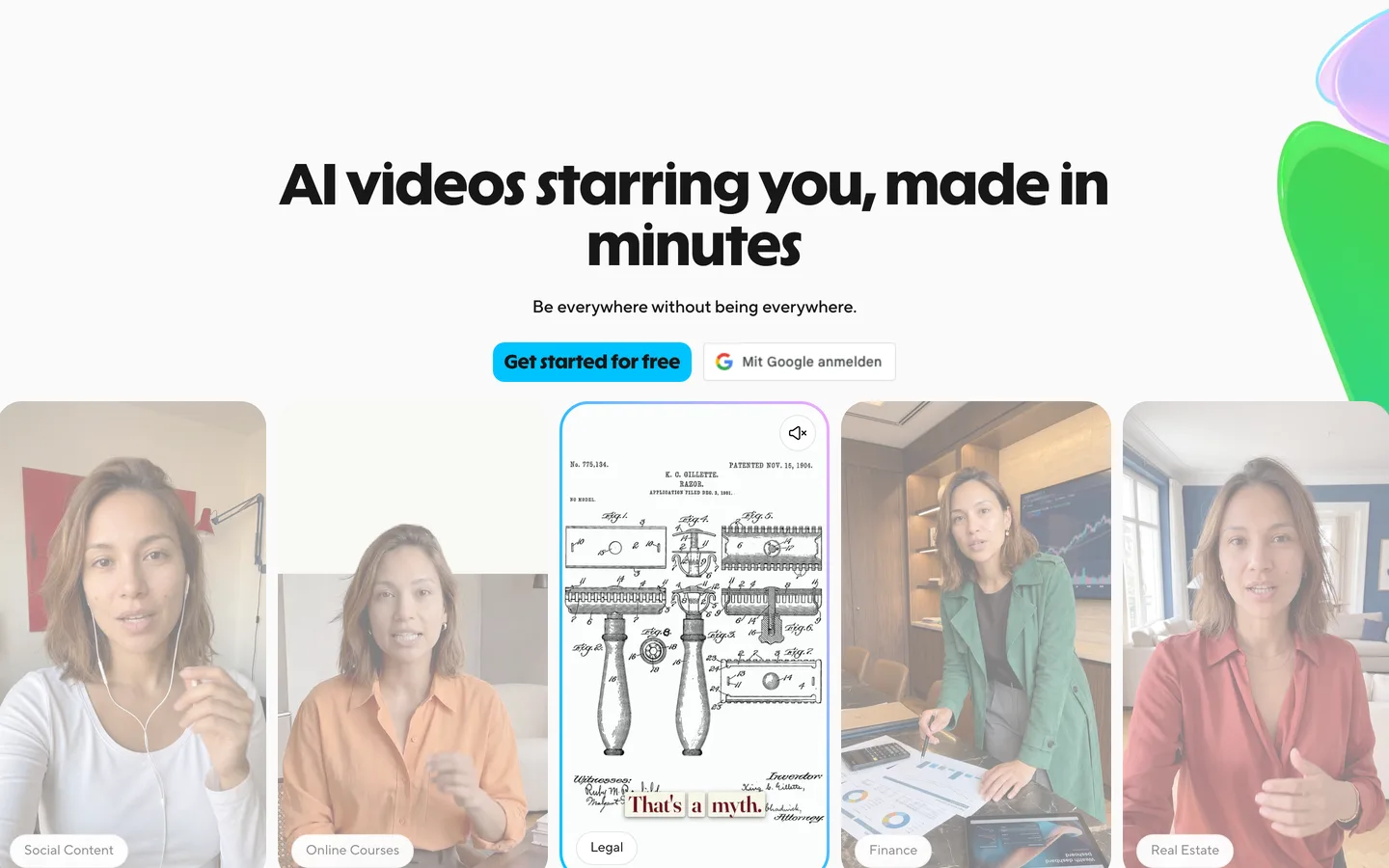
HeyGen is an AI-powered video creation platform that generates professional talking-head videos using digital avatars. You write a script, choose (or create) an avatar, select a voice, and HeyGen produces a polished video in minutes. The platform also translates existing videos into 175+ languages with AI lip-sync, making it a complete solution for multilingual video content.
The tool targets three primary audiences: marketing teams producing video content at scale, L&D departments creating training materials across languages, and businesses that need a consistent video presence without the logistics of traditional production. What separates HeyGen from competitors like Synthesia is its translation engine, avatar realism with Avatar IV, and the breadth of creative tools including AI-generated B-roll.
How We Built This Guide#
This guide is based on HeyGen's official documentation, verified pricing from heygen.com/pricing, and real user feedback from G2 and Trustpilot, plus community discussions on Reddit. We analyzed HeyGen's feature set, pricing structure, and market positioning against alternatives. All facts were last verified September 2026.
Our sources include:
- Official product pages and documentation
- G2 user reviews (verified ratings)
- Trustpilot reviews
- Reddit community discussions
- Changelog and release notes
- Competitor comparison data
Features in Depth#
Avatar IV: Next-Generation Realism#
Avatar IV represents a significant leap in digital avatar quality. Head movements, micro-expressions, and eye tracking are noticeably more natural than previous generations. According to user reports, non-technical viewers often cannot reliably distinguish Avatar IV from real webcam footage in short clips. The avatar maintains consistent lighting and skin texture throughout longer videos, which was a problem in earlier versions. You can choose from 100+ stock avatars or create custom avatars from a few minutes of reference footage.
Video Translation with Precision Mode#
HeyGen's translation feature is its strongest differentiator. Upload any video and it translates the audio into 175+ languages while re-syncing the speaker's lip movements to match the new language. The Precision Mode engine handles occlusion (when hands or objects partially cover the face), multi-speaker scenarios, and context-aware translation that adapts to character count and timing constraints. Based on user reports, the results are natural enough for client-facing use with only minor script adjustments needed.
Custom Avatar Creation#
Upload 2-5 minutes of yourself speaking on camera, and HeyGen creates a digital twin that can deliver any script in your voice and likeness. The setup takes about 30 minutes including recording and processing. Users report that after initial calibration, custom avatars produce videos suitable for external communications. This eliminates the scheduling bottleneck of traditional video production.
AI Studio and Templates#
The editing interface provides a timeline-based workspace with drag-and-drop elements, text overlays, background music, and scene transitions. Templates cover common formats: training videos, product demos, social media clips, and corporate announcements. The workflow is straightforward enough that marketing team members without video editing experience produced polished results within their first session.
Interactive Video Agent#
HeyGen's Video Agent feature enables AI-powered interactive video conversations. An avatar responds to viewer questions in real-time, creating an experience closer to a video call than a pre-recorded clip. Use cases include customer support, product demos, and interactive training. It is still early-stage, but the technology is impressive for scenarios where personalized engagement matters.
B-Roll Integration#
Recent updates added AI-generated B-roll footage powered by Sora 2 and Veo 3.1. Instead of searching stock libraries, you describe the B-roll you need and HeyGen generates contextually appropriate footage. This keeps the entire video production workflow within one platform.
2026 Updates: Faster Avatars, Credits Overhaul, and Integrations#
HeyGen shipped substantial updates in January and February 2026. Avatar creation now takes just 15 seconds: turn on your webcam, follow a short guided prompt, and the system captures your appearance, voice, motion, and consent in a single recording.
The credits system was overhauled for transparency: "Generative Credits" were renamed to "Premium Credits," premium features are clearly labeled throughout the product, upfront cost estimates appear before generation, and credit-free alternatives are suggested when you are running low. Notably, audio dubbing is now unlimited and no longer costs credits.
New integrations include ChatGPT video creation (generate HeyGen avatar videos directly from ChatGPT), a Canva integration for creating avatar videos inside the Canva editor, and a Video Agent API for prompt-to-video workflows. HeyGen also launched on Agent.ai, enabling users to turn blog posts and scripts into avatar videos without leaving their existing workflow.
Pros
- Avatar IV produces digital humans realistic enough to pass for webcam footage in short clips, eliminating the need for on-camera talent
- Video translation into 175+ languages with AI lip-sync makes multilingual content production practical for small teams
- Custom avatar creation from a few minutes of footage turns any person into an always-available video presenter
- The web-based editor requires no video editing experience while still producing professional-quality output
- Creator plan's 600 monthly credits cover a solid volume of standard videos, and unused credits roll into predictable monthly costs
- Precision Mode translation handles multi-speaker videos and partial face occlusion reliably
Cons
- Creator plan at $29/month limits you to 1080p and basic features; Pro at $49/month is needed for most business use cases. G2 reviewers frequently cite cost as a concern (205+ mentions)
- Trustpilot and Reddit users report processing times spiking to 5-24 hours after the first 30-50 videos, with hidden daily limits even on 'unlimited' plans
- Annual subscribers report feature changes without communication, including translation minutes being reduced from unlimited to 120 minutes per month overnight
- Customer support is a recurring complaint: Trustpilot reviews describe unresponsive support, videos stuck in moderation without explanation, and generic bot responses instead of human help
- Avatar movements are limited to upper body; full-body gestures and walking sequences are not yet supported
Features (4.7): Avatar creation, video translation, interactive agents, AI B-roll, and a full editing suite make HeyGen the most feature-complete avatar video platform. Only the lack of full-body avatar motion keeps it from a higher score.
Ease of Use (4.8): Script-to-video in minutes. The editor is intuitive, templates accelerate common workflows, and the translation feature requires nothing more than uploading a video and selecting a language.
Value for Money (4.0): The Creator plan at $29/month is accessible for individuals, and the Pro plan at $49/month adds 4K output and more credits for serious business use. Compared to traditional video production costs ($500-$5,000+ per video), the value proposition is strong.
Performance (4.5): Video rendering completes in 2-10 minutes depending on length and complexity. Translation processing is similarly fast. The platform is generally stable according to G2 reviews.
Accuracy (4.4): Avatar lip-sync is remarkably accurate for most languages. Translation quality is strong for major languages, though less common language pairs occasionally produce awkward phrasing that requires manual review.
Pricing Breakdown#
| Plan | Price | Key Features |
|---|---|---|
| Free | $0 | 3 videos/month, Watermark, Basic stock avatars, 3 min translation |
| Creator | $29/mo | 600 credits/mo, Videos up to 30 min (1080p), 1 custom avatar, Standard translation |
| ⭐ Pro | $49/mo | 1,000 credits/mo, 4K resolution, 3 custom avatars, Precision Translation, Priority rendering |
| Business | $149/mo | 1,500 credits/mo, 5 custom avatars, 60-min video length, SAML/SSO, Advanced collaboration |
HeyGen offers four tiers as of March 2026:
Free — 3 videos per month with watermark. Access to basic stock avatars and standard voices. Includes up to 3 minutes of video translation. No credit card required. Sufficient for evaluation only.
Creator ($29/month, $24/month annual) — 600 credits per month for videos up to 30 minutes long at 1080p, not unlimited video creation. Access to all stock avatars, 1 custom avatar, standard translation, and basic templates. Premium features like Avatar IV and Precision Translation cost additional credits. This plan works for individual creators and freelancers who stay within the monthly credit allowance.
Pro ($49/month, $39.20/month annual) — Everything in Creator plus 1,000 credits per month, 4K resolution, 3 custom avatars, priority rendering, and Precision Translation included. The sweet spot for businesses producing regular video content.
Business ($149/month, $119/month annual) — Everything in Pro plus 1,500 credits per month, 5 custom avatars, 60-minute video length, SAML/SSO, centralized billing, and advanced collaboration. Each additional seat costs $20/month.
Enterprise (custom) — Dedicated account management, custom API integrations, SLA guarantees, and unlimited custom avatars. Contact HeyGen for pricing.
Premium Credit Packs: Additional credits (formerly called "Generative Credits," renamed to "Premium Credits" in early 2026) available at $15/month (300 credits) or $150/year for add-on capacity. Audio dubbing is now unlimited and no longer consumes credits.
Hidden costs to consider: The Creator plan's premium credits run out quickly if you use Avatar IV and Precision Translation regularly. Most businesses will find themselves on the Pro plan within a month. Annual billing saves 17-20% across all tiers.
Free
- 3 videos/month
- Watermark
- Basic avatars
Creator
- 600 credits/mo
- Videos up to 30 min (1080p)
- 1 custom avatar
Pro
- 1,000 credits/mo
- 4K resolution
- 3 custom avatars
- Precision Translation
Business
- 5 custom avatars
- 60-min video
- SAML/SSO
Similar Tools Worth Considering#
- Synthesia: The closest competitor with similar avatar quality and 160+ languages. Stronger template library for corporate use cases. Pricing starts lower at $18/month but with tighter limits. Better for strictly corporate training and explainer videos.
- Colossyan: Focuses on learning and development with scenario-based video creation. Smaller avatar library but strong in branching educational content.
- Descript: Not an avatar platform, but strong for editing existing video with AI. Better if you already have footage and need to edit, repurpose, and transcribe rather than generate from scratch.
- D-ID: Simpler avatar creation focused on quick, short-form content. Less feature-rich but easier to start with for basic use cases.
For creative AI video generation rather than avatar-based content, explore Pika, Sora, or Luma Dream Machine. HeyGen is featured in our Best AI Tools 2026 guide.
Who Should Use HeyGen?#
Best for marketing teams producing video at scale: Create product demos, social media videos, and ad creatives without scheduling film shoots. A single marketer can produce 10+ polished videos per week.
Best for L&D and training departments: Produce onboarding videos, compliance training, and process documentation in multiple languages from one source script. Updates are as simple as editing the text and re-rendering.
Best for global businesses needing multilingual content: The translation engine turns a single English video into 175+ language variants with natural lip-sync. This replaces the traditional workflow of hiring voice actors and re-editing for each market.
NOT for you if you need creative, cinematic video content (Pika or Sora offer more creative generation), you want full-body avatars for entertainment or gaming applications, or you have a budget under $100/month and need more than basic avatar videos.
HeyGen is the strongest AI avatar video platform in 2026, combining the most realistic avatars with the best translation engine in the category. For businesses that need professional video content across languages without traditional production logistics, it delivers genuine ROI from the first month.
Its biggest strength is the translation pipeline: upload a video in one language and get a lip-synced version in 175+ languages within minutes. Its biggest weakness is cost: meaningful use requires the Pro plan at $49/month, and premium features consume credits that can push costs higher.
If your team produces regular video content and wants to scale without scaling production costs, start with the Creator plan and upgrade to Pro when the credit limits become a bottleneck.
FAQ#
Is HeyGen free to use in 2026?#
Yes. The free plan gives you 3 videos per month with a watermark and access to basic stock avatars. You also get up to 3 minutes of video translation. No credit card is required. For regular use, you will need the Creator plan ($29/month) or higher.
How realistic are HeyGen avatars?#
Avatar IV, the latest generation, produces results that are difficult to distinguish from real webcam footage in short clips. Lip-sync, micro-expressions, and skin rendering are notably natural. Longer videos and extreme expressions can occasionally reveal artifacts, but for typical business video use cases, the quality is production-ready.
Can HeyGen translate videos into other languages?#
Yes. HeyGen translates videos into 175+ languages and dialects. The AI re-syncs the speaker's lip movements to match the new language and clones the original voice. Precision Mode, available on Pro and above, handles multi-speaker videos, face occlusion, and context-aware translation for the most natural results.
How does HeyGen compare to Synthesia?#
Both are strong avatar video platforms. HeyGen leads in translation quality (175+ languages with Precision Mode), avatar realism (Avatar IV), and creative tools (AI B-roll, Video Agent). Synthesia offers a lower entry price ($18/month), stronger corporate templates, and a slightly simpler editing experience. For multilingual content, HeyGen has the edge. For straightforward corporate training videos, Synthesia is a strong alternative.
Can I create a custom avatar that looks like me?#
Yes. Record 2-5 minutes of yourself speaking on camera, and HeyGen creates a digital twin that speaks any script in your voice and likeness. The Creator plan includes 1 custom avatar, Pro includes 3, and Business includes 5. Enterprise plans offer unlimited custom avatars.
Sources#
- https://www.heygen.com/pricing
- https://help.heygen.com/en/articles/9204682-heygen-pricing-plans-and-subscriptions-explained-what-you-need-to-know
- https://www.heygen.com/avatars/ai-video-avatar
- https://www.heygen.com/blog/heygen-february-2026-release
- https://www.heygen.com/blog/heygen-january-2026-release
- https://www.heygen.com/blog/heygen-premium-features-update
- https://www.trustpilot.com/review/heygen.com
- https://www.g2.com/products/heygen/reviews
