This site contains affiliate links. We may earn a commission at no extra cost to you. This helps us keep the site running and continue providing free guides and comparisons.
Verdict#
Cursor is the most powerful AI code editor available in 2026. It takes the familiar VS Code foundation and rebuilds the development experience around AI: Cmd+K inline editing, multi-file Agent mode, codebase-aware chat, and multi-model support create something that goes far beyond what plugins can achieve. Many developers have switched from VS Code and report not looking back. The trade-off is commitment: you change editors, learn new workflows, and navigate credit-based pricing. For developers willing to make that investment, the returns are substantial.
Rating: 4.7/5 | Price: Free / $20 / $60 / $200 per month | Free tier: Yes (limited) | Last verified: March 2026
Score Breakdown
Key Facts#
- Plans: Hobby (free), Pro ($20/mo), Pro+ ($60/mo), Ultra ($200/mo), Teams ($40/user/mo), Enterprise (custom)
- Credit system: Monthly usage pool equal to plan price; Auto mode is unlimited
- Platforms: macOS, Windows, Linux (VS Code fork), JetBrains IDEs via ACP (since March 2026)
- Highlights: Cmd+K inline editing, Agent mode, Composer 2, multi-model support, Automations
This article contains affiliate links. We earn a commission at no extra cost to you. See our How We Make Money page.
What Is Cursor and Who Is It For?#
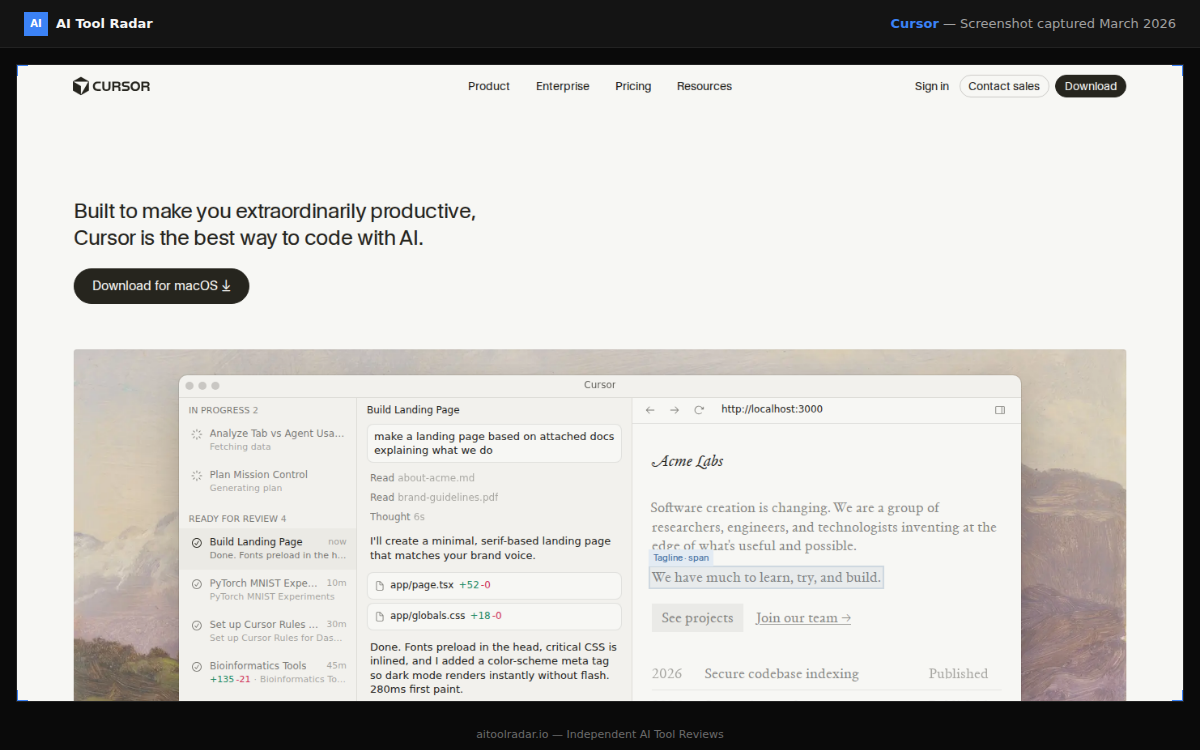
Cursor is an AI-native code editor built on VS Code that puts AI at the center of every interaction. Rather than bolting AI features onto an existing editor, Cursor was designed to make AI the primary way you write and edit code. Inline editing with Cmd+K, codebase-aware chat, multi-file Agent mode, and support for multiple AI models (Claude, GPT-5, and others) create an experience that feels like pair programming with a capable partner.
Cursor is for developers who want the most advanced AI coding experience available and are willing to switch editors to get it. Full-stack developers, startup engineers, and anyone building with modern frameworks like Next.js, React, or Python will see the biggest gains. If you value speed of feature implementation over sticking with your current IDE, Cursor is the tool to evaluate.
How We Built This Guide#
This guide is based on Cursor's official documentation, verified pricing from cursor.com/pricing, and real user feedback from community discussions on Reddit and developer forums. We analyzed Cursor's feature set, pricing structure, and market positioning against alternatives like GitHub Copilot and Claude Code. All facts were last verified March 2026.
Our sources include:
- Official product pages and documentation
- Reddit developer community discussions
- Cursor changelog and release notes
- Developer blog reviews and comparisons
- Competitor comparison data
Why Cursor
Visit provider- Cmd+K Inline EditingThis is Cursor's signature feature and the one that changes typical workflows.
- Agent Mode: Autonomous Multi-Step TasksAgent mode is where Cursor goes beyond any IDE plugin.
- Composer 2Released on March 19, 2026, Composer 2 brings frontier-level coding performance to challenging tasks.
- Codebase-Aware ChatCursor's chat panel indexes your entire project.
- Multi-Model SupportCursor supports multiple AI models: Claude Sonnet 5, Claude Opus 5.5, GPT-5, and others.
Features in Depth#
Cmd+K Inline Editing#
This is Cursor's signature feature and the one that changes typical workflows. Select code or place your cursor in a file, press Cmd+K, describe what you want in natural language, and Cursor generates the edit as a diff you can accept or reject. "Add error handling to this function," "refactor this to use React Server Components," "convert this callback to async/await" -- all applied directly to your code.
What makes Cmd+K powerful is context. Cursor considers the selected code, the full file, imported modules, and referenced types. The results are not generic transformations; they respect your codebase's patterns and conventions. Based on user reports, Cmd+K handles about 80% of the edits developers would otherwise make manually.
Agent Mode: Autonomous Multi-Step Tasks#
Agent mode is where Cursor goes beyond any IDE plugin. It autonomously plans and executes a sequence of actions: reading files, making edits across multiple files, running terminal commands, and iterating on errors until the task is done. Unlike simpler chat interactions, Agent mode can loop through debug cycles automatically without you approving every step.
Subagents run in parallel to explore your codebase, each using the best model for the task, with a custom embedding model for recall across large codebases. For implementing a new feature that touches components, API routes, types, and tests simultaneously, Agent mode is dramatically faster than making changes file by file.
Composer 2#
Released on March 19, 2026, Composer 2 brings frontier-level coding performance to challenging tasks. It handles multi-file edits with higher accuracy and better reasoning about complex codebases. You describe a feature in natural language, and Composer generates edits across all affected files. Each change appears as a reviewable diff you accept or reject individually.
Codebase-Aware Chat#
Cursor's chat panel indexes your entire project. Reference specific files, functions, or types with @ mentions. Ask "@database.ts how does the connection pooling work?" and get an answer grounded in your actual code, not generic documentation. The chat maintains conversation context across turns, making it effective for multi-step debugging or incremental refactoring.
Multi-Model Support#
Cursor supports multiple AI models: Claude Sonnet 5, Claude Opus 5.5, GPT-5, and others. Auto mode selects the best model automatically and does not consume premium credits. Manually selecting frontier models draws from your monthly credit pool. This flexibility means you can use faster models for simple tasks and reserve heavy reasoning for complex problems.
Tab Completions and VS Code Compatibility#
Beyond the AI-specific features, Cursor includes predictive tab completions that keep your typing flow uninterrupted. And since Cursor is a VS Code fork, your existing extensions, themes, keybindings, and settings carry over seamlessly. You lose nothing from your current setup and gain the AI features on top.
Automations, Cloud Agents, and Bugbot#
New in 2026, Cursor Automations let you build agents that trigger on a schedule or on events from external tools. When a trigger fires, Cursor spins up a cloud sandbox, follows your instructions, uses configured MCPs, and can remember outcomes of previous runs. Self-hosted cloud agents (March 25, 2026) keep your code and tool execution entirely in your own network for privacy-sensitive teams. Bugbot, which graduated from reviewer to fixer in late February 2026, spins up a cloud agent to test fixes and proposes them directly on your PR.
JetBrains IDE Support#
As of March 4, 2026, Cursor is available in IntelliJ IDEA, PyCharm, WebStorm, and other JetBrains IDEs through the Agent Client Protocol (ACP). This lets JetBrains users access Cursor's AI features, including any frontier model from OpenAI, Anthropic, and Google, without switching to the VS Code-based editor.
Strengths & Limitations#
Pros
- Cmd+K inline editing is the fastest way to make AI-driven code changes, handling ~80% of edits you would make manually
- Agent mode and Composer 2 handle multi-file edits that no IDE plugin can match
- Full VS Code compatibility: extensions, themes, and keybindings transfer with zero migration pain
- Multi-model support lets you pick the right AI for each task, Auto mode is unlimited
- Codebase indexing with subagents provides genuinely context-aware responses across large projects
- Automations and cloud agents extend AI assistance beyond the editor
Cons
- Requires switching from your current editor, which is a real commitment for developers with established workflows (JetBrains support via ACP now reduces this barrier)
- Credit-based pricing shifted from 500 fixed fast responses to a $20 usage pool, effectively reducing requests from ~500 to ~225 per month on Pro, and cost per operation is opaque
- A confirmed March 2026 code reversion bug silently undid user changes due to Agent Review, Cloud Sync, and Format On Save conflicts
- Reddit users report the AI 'randomly breaking code' after updates, requiring time-consuming reverts during complex multi-file operations
- Privacy: code is sent to cloud models by default, which matters for sensitive codebases (self-hosted cloud agents now address this for Teams)
Pricing Breakdown#
Cursor uses a credit-based billing system. Prices verified March 2026 from the official pricing page:
| Plan | Price | Usage Credits | Auto Mode | Key Features |
|---|---|---|---|---|
| Hobby (Free) | $0 | Limited | Limited | Limited Agent requests, limited Tab completions |
| Pro | $20/mo (~$16/mo annual) | $20/month pool | Unlimited | Unlimited Tab completions, extended Agent limits |
| Pro+ | $60/mo | $60/month pool (3x) | Unlimited | 3x credits for frontier model usage |
| Ultra | $200/mo | 20x usage | Unlimited | Priority feature access, maximum model usage |
| Teams | $40/user/mo | $20/user/month pool | Unlimited | Centralized billing, shared rules, privacy mode |
| Enterprise | Custom | Custom | Unlimited | Advanced security, compliance, governance |
Credits deplete based on which AI model you select. The Pro plan's $20 credit pool covers approximately 225 Sonnet 4 requests, 550 Gemini requests, or 650 GPT 4.1 requests per month. Auto mode is unlimited and does not consume credits, making it the most cost-effective option for most workflows.
The Pro plan at $20/month is where Cursor becomes essential. Auto mode completions are unlimited, and the $20 credit pool covers a full day of active development for most workflows. Pro+ at $60/month is for developers who regularly hit Pro limits with frontier models. Ultra at $200/month is niche but makes sense for developers treating Cursor as their all-day primary tool with heavy model usage.
| Plan | Price | Key Features |
|---|---|---|
| Hobby | $0 | Limited Agent requests, Limited Tab completions |
| Pro ⭐ | $20/mo | $20 model credit pool, Unlimited Auto mode, Extended Agent limits |
| Pro+ | $60/mo | $60 credit pool (3x), Unlimited Auto mode, Frontier model usage |
| Ultra | $200/mo | 20x usage, Priority features, Maximum model usage |
| Teams | $40/user/mo | $20/user credit pool, Centralized billing, Privacy mode |
| Enterprise | Custom | Advanced security, Compliance, Governance |
Prices may change. Check the official Cursor pricing page for current pricing.
Hobby
- Limited Agent requests
- Limited Tab completions
- Basic features
Pro
- Unlimited completions
- 500 fast requests
- All models
Pro+
- 3x Pro usage
- Priority access
- All models
Ultra
- 10x Pro usage
- Maximum speed
- Enterprise features
Similar Tools Worth Considering#
- GitHub Copilot: Best for developers who want AI in their existing IDE without switching. Non-disruptive completions, free tier, IP indemnity on Business plan. See our Cursor vs Copilot comparison and coding tools comparison.
- Claude (via Claude Code): Terminal-based AI development. Better for complex refactoring and project-level reasoning across many files. Complements Cursor well.
- Windsurf (formerly Codeium): Another AI-first editor with a generous free tier. Worth trying if Cursor's credit-based pricing is a concern.
- Zed: Fast, multiplayer code editor with emerging AI features. Still early but promising for teams that value speed and collaboration.
- VS Code + Continue: Open-source AI coding extension that brings chat and editing to VS Code without switching editors. Less powerful than Cursor but zero cost.
See how Cursor ranks in our Best AI Tools 2026 guide.
Who Should Use Cursor?#
Best for full-stack developers who work across frontend and backend codebases. Composer and Agent mode excel when implementing features that touch components, API routes, database queries, and type definitions simultaneously.
Best for startup engineers and solo developers who need to move fast. The ability to describe features in natural language and have them implemented across files is like having a junior developer who works at machine speed.
Best for developers learning new frameworks. Codebase chat with @ mentions gives answers grounded in your actual code, not generic documentation. Cmd+K edits help apply unfamiliar patterns correctly.
NOT for you if you prefer a lightweight, non-disruptive AI assistant inside your existing IDE. GitHub Copilot at $10/month adds completions to VS Code or JetBrains without requiring you to switch editors. Also not ideal if your team has strict data governance requirements and cannot use cloud-based models (though the Teams plan offers zero-retention privacy mode).
Cursor is the best AI code editor in 2026. It has taken the VS Code experience and fundamentally enhanced it with AI capabilities that plugins cannot replicate. Cmd+K, Agent mode, Composer 2, and Automations are genuine workflow innovations that save hours, not minutes.
The catch is commitment. You switch editors, learn new workflows, and pay $20/month for the full experience. The credit system means costs can scale with heavy frontier model usage. For developers willing to make that investment, the returns are substantial. For those who prefer a lighter touch, GitHub Copilot at $10/month inside your current IDE is the safer choice.
If you have not tried Cursor, the free Hobby plan gives you enough to evaluate whether the AI-first approach matches your working style. For most developers who have tried it seriously, there is no going back.
FAQ#
Is Cursor free?#
Cursor offers a free Hobby plan with limited Agent requests and limited Tab completions. This is enough to evaluate the editor, but for daily development, the Pro plan at $20/month is necessary. Annual billing reduces it to approximately $16/month. Check cursor.com/pricing for current pricing.
Is Cursor just VS Code with AI?#
Cursor is a VS Code fork, so extensions, themes, and keybindings all work. But the AI integration goes much deeper than any extension can achieve. Cmd+K inline editing, Agent mode, Composer 2, codebase indexing, and Automations are built into the editor core, not bolted on. The architecture enables capabilities that plugins cannot replicate.
Which AI models does Cursor support?#
Cursor supports Claude Sonnet 5, Claude Opus 5.5, GPT-5, and other models. Auto mode selects the best model automatically without consuming premium credits. Manually selecting frontier models draws from your monthly credit pool, with costs varying by model.
How does Cursor's credit system work?#
Each paid plan includes a monthly credit pool equal to the plan price ($20 on Pro, $60 on Pro+, etc.). Auto mode requests are unlimited and free. Manually selecting frontier models consumes credits based on the model used. The Pro plan's $20 pool covers approximately 225 Sonnet 4 or 650 GPT 4.1 requests per month.
Is Cursor better than GitHub Copilot?#
For AI-driven development with inline editing, multi-file changes, and Agent mode, Cursor is more powerful. For lightweight, non-disruptive completions within your existing IDE, GitHub Copilot is simpler and cheaper. Many developers use both. See our coding tools comparison.
Can I use my VS Code extensions in Cursor?#
Yes, fully compatible. Extensions, themes, keybindings, and settings transfer directly from VS Code. Most developers find the transition seamless. The only thing that changes is the addition of Cursor's AI features.
