This site contains affiliate links. We may earn a commission at no extra cost to you. This helps us keep the site running and continue providing free guides and comparisons.
The Bottom Line#
Claude is the best AI assistant for tasks that require genuine thinking. If your work involves complex codebases, long documents, nuanced writing, or careful analysis, Claude consistently outperforms every competitor we have evaluated. The combination of Opus 5.5's reasoning depth, the 1 million token context window, and Claude Code's terminal-based workflow has fundamentally changed how developers build software. It lacks image generation and the plugin ecosystem of ChatGPT, but for the work that matters most, nothing else comes close.
Rating: 4.6/5 | Price: Free / $20 / $100-$200 / $20-$125 per seat | Last verified: September 2026
Score Breakdown
Key Facts#
- Pricing: Free, Pro ($20/mo), Max ($100 or $200/mo), Team ($20-$125/seat/mo), Enterprise (custom)
- Free tier: Yes, Sonnet 5 with daily usage limits
- Platforms: Web, iOS, Android, macOS, Windows, API
- Latest models: Fable 5.1 (Sep 1, 2026), Opus 5.5 (Sep 22, 2026), Sonnet 5 (Jun 30, 2026), Haiku 4.5
- Context window: Up to 1 million tokens (Opus 5.5, Sonnet 5)
What Is Claude and Who Is It For?#
Claude is Anthropic's AI assistant, built with a focus on safety, honesty, and deep reasoning. While ChatGPT dominates headlines with 900 million weekly users, Claude has become the preferred tool for developers, researchers, and professionals who prioritize accuracy and depth over breadth.
The current model family spans four tiers: Haiku 4.5 for fast, lightweight tasks; Sonnet 5 for capable everyday use; Opus 5.5 for deep reasoning at a lower price than the flagship; and Fable 5.1 for the most demanding, long-running agent work. Opus 5.5, Sonnet 5, and Fable 5.1 all support a 1 million token context window, which changes what is practically possible with AI: you can feed it an entire codebase, a 300-page legal document, or months of research notes and get coherent, contextually accurate responses.
What makes Claude different is not a single feature but a philosophy. It reasons more carefully, admits uncertainty instead of hallucinating answers, and produces output that reads less like AI-generated text. For developers, the combination of Claude Code and the massive context window creates a workflow that no other tool replicates.
How We Built This Guide#
This guide is based on Anthropic's official documentation, verified pricing from claude.com/pricing, and real user feedback from G2 and community discussions on Reddit. We analyzed Claude's feature set, pricing structure, and market positioning against alternatives like ChatGPT and Google Gemini. All facts were last verified March 2026, and pricing and model lineup were re-verified in September 2026.
Our sources include:
- Official product pages and documentation
- G2 user reviews (verified ratings)
- Reddit community discussions
- Anthropic changelog and release notes
- Competitor comparison data
Why Claude
Visit provider- 1M Token Context WindowThis is Claude's defining technical advantage.
- Claude Code: Terminal-Based DevelopmentClaude Code is the feature that turned Claude from a useful chatbot into an essential development tool.
- Artifacts: Interactive Prototyping
- Projects and Persistent ContextProjects let you upload reference documents, style guides, codebases, or API documentation that persist across conversations.
- Agent TeamsIntroduced with Opus 4.6, Agent Teams spin up multiple Claude instances working on different parts of a project simultaneously.
Features in Depth#
1M Token Context Window#
This is Claude's defining technical advantage. While most AI models handle 128K-256K tokens, Claude's Opus 5.5 and Sonnet 5 support up to 1 million tokens of context. In practical terms, that means you can paste an entire repository, a 300-page document, or months of meeting transcripts and Claude works with all of it coherently.
Developers report feeding Claude entire project directories with 50+ files totaling hundreds of thousands of tokens. It tracks variable names, understands import chains, identifies patterns across files, and makes changes that are consistent with the full codebase. This is not a marketing number; the model genuinely maintains coherence at scale, with less drift than competitors at extreme context lengths based on user reports.
Claude Code: Terminal-Based Development#
Claude Code is the feature that turned Claude from a useful chatbot into an essential development tool. It operates directly in your terminal, reads your project files, understands your codebase structure, creates and edits files, runs commands, executes tests, and handles git operations.
Unlike IDE plugins that offer line-by-line autocomplete, Claude Code operates at the project level. Describe a feature, and it plans the approach, creates the necessary files, writes the implementation, and verifies it works. For bug fixes, it traces the issue through your codebase, identifies the root cause, and implements a fix across multiple files. Recent March 2026 updates added voice mode (via /voice), scheduled tasks with /loop, and remote desktop control through Computer Use.
Based on developer reports, Claude Code handles a significant share of implementation work. You describe what you want, review the changes, and iterate. For a web developer, the productivity gain is substantial.
Artifacts: Interactive Prototyping#
Artifacts let Claude create standalone outputs directly in conversation: code files, HTML pages, SVG diagrams, interactive React components, documents, and more. Instead of a code block in chat, you get a rendered preview you can iterate on.
Artifacts are particularly useful for UI prototyping. Describe a component, and Claude renders a working React preview you can refine through conversation. For client presentations, you can generate interactive demos in minutes that would take hours to build from scratch.
Projects and Persistent Context#
Projects let you upload reference documents, style guides, codebases, or API documentation that persist across conversations. Every conversation within a Project starts with that shared context. For teams, this means you can create a Project with your coding standards, architecture decisions, and domain knowledge, and every team member gets contextually informed responses.
Teams maintain Projects for each client, loaded with their design system, codebase conventions, and technical constraints. The difference in response quality between a generic conversation and one grounded in Project context is significant.
Agent Teams#
Introduced with Opus 4.6, Agent Teams spin up multiple Claude instances working on different parts of a project simultaneously. One agent handles the backend, another the frontend, a third writes tests. For larger tasks, this parallel execution dramatically reduces completion time.
Computer Use and Cowork#
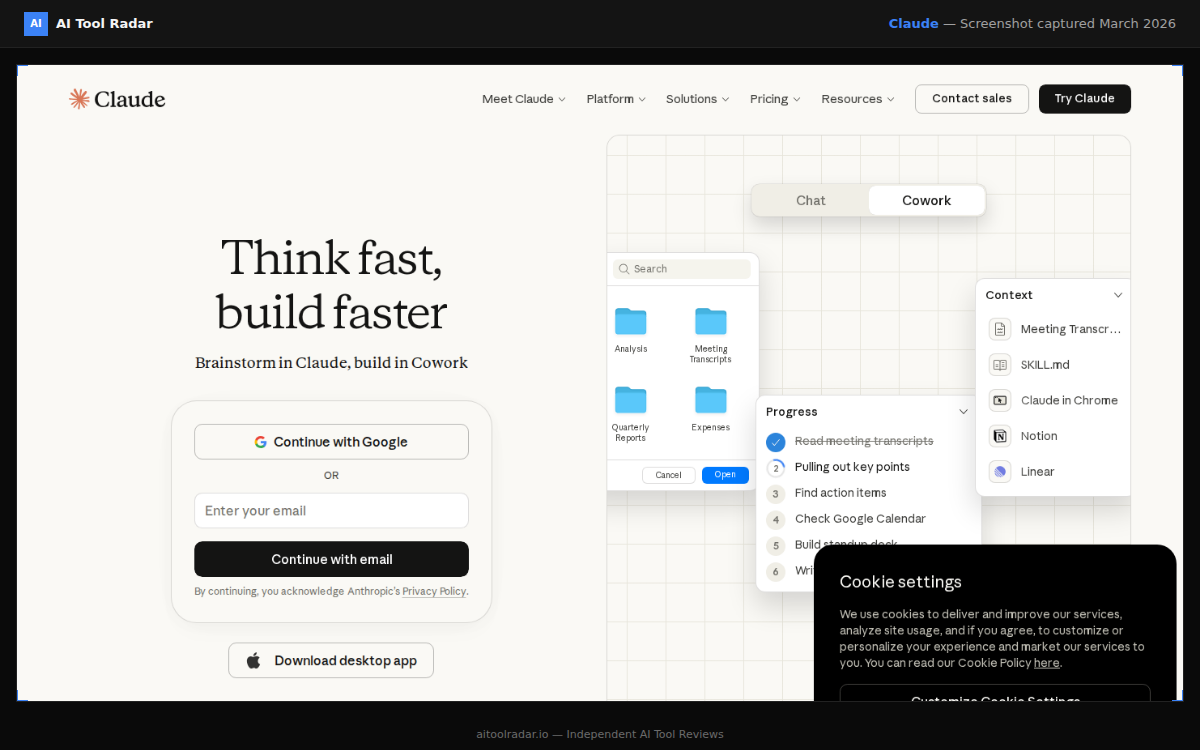
Computer Use, added in March 2026, lets Claude open files, run dev tools, point, click, and navigate your screen to perform tasks with no setup required. Available for Pro and Max users through Cowork, it creates a persistent agent thread you can manage from mobile and desktop. This bridges the gap between chat-based AI and hands-on automation.
Web Search#
Claude now includes web search powered by Brave Search for all paid users. It searches the web to inform responses with current information and fetches content from specific URLs. The results are solid for factual queries, though less polished than ChatGPT's web browsing.
Memory and Visualizations#
Memory from chat history is now available for all Claude users, including free users. Claude learns your preferences and context over time without manual configuration. On mobile, Claude can now create interactive charts, diagrams, and shareable visualizations rendered directly in conversations, making data discussions more productive on the go.
Extended Thinking and Adaptive Reasoning#
Claude dynamically decides when and how much to think. Simple questions get immediate responses. Complex reasoning engages extended thinking that produces noticeably better results. You can see the reasoning process step by step, which builds trust and lets you verify logic.
MCP Tool Integrations#
The Model Context Protocol (MCP) is an open standard that lets Claude connect to external tools and data sources: databases, APIs, file systems, Jira, Slack, Google Drive, and custom tooling. This extensibility turns Claude from a chat interface into a hub for complex, multi-tool workflows. For developers, MCP integrations are straightforward to set up and genuinely useful.
Pros
- Best-in-class reasoning depth: Opus 5.5 consistently produces more accurate, nuanced responses than any competitor on complex tasks
- 1M token context window processes entire codebases and long documents coherently, with less drift than alternatives at extreme lengths
- Claude Code transforms terminal-based development, handling multi-file edits, git operations, and test execution at the project level
- Honest about uncertainty: when Claude does not know something, it says so instead of confidently hallucinating
- Artifacts enable rapid prototyping of interactive React components, diagrams, and documents directly in conversation
- Strong privacy stance with clear data policies; Team and Enterprise plans guarantee data is never used for training
Cons
- No native image or video generation capability; you need ChatGPT with DALL-E or Midjourney for visual content
- Smaller ecosystem than ChatGPT: no equivalent to the GPT Store's thousands of specialized assistants
- Free tier is more restrictive than ChatGPT's, with tighter daily message limits
- Opus 5.5 can be slower than GPT-5.4 on simple tasks where deep reasoning is unnecessary
- Max plan pricing ($100-$200/month) is steep, though necessary for heavy Claude Code users who hit Pro limits
- Service reliability has been inconsistent in March 2026: multiple outages affected claude.ai, and Claude Code users report rate limits draining faster than expected on Max subscriptions
Features (4.5): Claude covers chat, code, documents, web search, voice, and tool integrations. It lacks image generation, video, and the plugin breadth of ChatGPT, which holds the score back.
Ease of Use (4.6): The web interface is clean and intuitive. Claude Code requires terminal comfort, which limits accessibility for non-developers. Projects and Artifacts are straightforward once you understand the workflow.
Value for Money (4.7): Pro at $20/month delivers Opus 5.5 reasoning quality that directly impacts work output. For developers using Claude Code daily, the Max plan at $100/month pays for itself through productivity gains. The free tier is useful for evaluation but too limited for regular work.
Performance (4.5): Sonnet 5 is fast for everyday tasks. Opus 5.5 with extended thinking takes longer on complex queries, which is the trade-off for deeper reasoning. Simple questions do not need Opus.
Accuracy (4.9): This is Claude's strongest dimension. Opus 5.5 produces the most reliable, carefully reasoned output of any AI assistant available. It flags uncertainty, avoids fabrication, and handles nuance better than competitors.
Pricing Breakdown#
Claude offers four consumer tiers and two business tiers as of March 2026:
Free — Access to Sonnet 5 with daily usage limits. You can upload files, use Artifacts, and access basic features. Sufficient for evaluation and light use, but the daily message cap makes it impractical for regular work.
Pro ($20/month, or $17/month billed annually) — The essential plan for professionals. Full access to Opus 5.5, Sonnet 5, and Haiku 4.5. Higher usage limits (5x Free), Projects, Claude Code access, extended thinking, web search, and priority during high-demand periods. This is where the value starts.
Max ($100/month or $200/month) — Everything in Pro with 5x usage limits at $100 or 20x at $200. Priority access to new features and models. Designed for developers and power users who rely on Claude Code as their primary development tool and consistently hit Pro rate limits.
Team ($20/seat/month standard, $100/seat/month premium billed annually; $25 and $125 billed monthly) — Everything in Pro plus shared workspace, admin controls, higher limits, and the guarantee that data is never used for training. Premium seats add Claude Code access and 5x usage. Minimum 5 members.
Enterprise (custom pricing) — SSO, SCIM provisioning, custom data retention, dedicated support, audit logging, and advanced security features.
Hidden costs to consider: Pro plan usage limits, while generous, can be a bottleneck during heavy Claude Code sessions. Upgrading to Max at $100-$200/month is a significant jump. Team premium seats at $100-$125/seat/month are expensive for organizations that want Claude Code access for every developer.
| Plan | Price | Key Features |
|---|---|---|
| Free | $0 | Sonnet 5, Daily usage limits, Basic features |
| ⭐ Pro | $20/mo | Opus 5.5, 1M context, Projects, Claude Code |
| Max | $100/mo | 5x Pro usage, Extended thinking, Priority access |
| Max Ultra | $200/mo | 20x Pro usage, Maximum capacity, All features |
Free
- Sonnet 5
- Daily usage limits
- Basic features
Pro
- Opus 5.5
- 1M context
- Projects
- Claude Code
Max
- 5x Pro usage
- Extended thinking
- Priority access
Max Ultra
- 20x Pro usage
- Maximum capacity
- All features
Similar Tools Worth Considering#
- ChatGPT: More versatile with image generation via DALL-E, video via Sora, the GPT Store, and broader integrations. Better as an all-in-one tool. Weaker on reasoning depth and coding quality. Compare ChatGPT vs Claude.
- Google Gemini: Strong Google Workspace integration and a large context window, though quality degrades at extreme lengths where Claude maintains coherence. Best if you live in the Google ecosystem.
- GitHub Copilot: Better for inline code completions within your IDE. Claude Code is better for project-level changes, architectural decisions, and multi-file refactoring. Different tools for different scales of coding work.
- Cursor: An AI-first code editor that supports Claude models with deep IDE integration. Consider it if you want Claude's reasoning in a graphical editor rather than the terminal. See our Cursor vs Copilot comparison and best AI coding tools comparison.
See all ChatGPT alternatives including Claude, or check how Claude ranks in our Best AI Tools 2026 guide.
Who Should Use Claude?#
Best for software developers: Claude is the strongest AI for serious development work. Claude Code handles multi-file refactoring, understands architecture patterns, writes clean code, and maintains consistency across large codebases. The 1M token context window means the model works with your entire project, not just the file you have open. If you code professionally, Claude should be your primary AI tool.
Best for researchers and analysts: Processing 300+ pages in a single conversation, combined with careful reasoning and honest uncertainty flagging, makes Claude the most reliable AI for analytical work. Legal contract review, financial modeling, and academic analysis all benefit from this precision.
Best for writers and content professionals: Claude produces prose that reads less like AI output than competitors. Better pacing, varied structure, and a more natural voice. The long context window maintains consistency across lengthy pieces.
Best for technical teams: The Team plan with Projects gives every conversation shared context from your documentation and coding standards. Premium seats with Claude Code turn Claude into a shared development platform.
NOT for you if you need image generation (use ChatGPT with DALL-E or Midjourney), want a massive ecosystem of pre-built assistants (ChatGPT's GPT Store is far larger), or prefer a visual IDE experience over terminal workflows (consider Cursor).
Claude is the most capable AI for work that demands genuine thinking. Opus 5.5's reasoning depth, the 1M token context window, and Claude Code's terminal workflow create a combination that no competitor matches for development, analysis, and writing.
Its biggest strength is accuracy: Claude reasons more carefully, admits what it does not know, and produces output you can trust more than any alternative. Its biggest weakness is breadth: no image generation, no video, no equivalent to the GPT Store, and a smaller ecosystem overall.
For developers, Claude is essential. The Pro plan at $20/month pays for itself within the first week of professional use. For researchers, analysts, and writers who need depth over breadth, it is the clear choice. If you want the AI that does the hard things best, Claude is the answer.
FAQ#
Is Claude better than ChatGPT?#
For reasoning depth, coding, and working with long documents, Claude is demonstrably stronger. For versatility including image generation, video, web browsing, and a plugin ecosystem, ChatGPT wins. Most professionals benefit from having access to both. See our full comparison.
What is Claude Code?#
Claude Code is a terminal-based AI development tool that reads your entire project, understands codebase structure, makes multi-file edits, runs commands, executes tests, and handles git operations. It operates at the project level rather than offering line-by-line completions. It requires a Claude Pro, Max, or Team subscription. Recent updates added voice mode, scheduled tasks via /loop, and Computer Use.
How big is Claude's context window?#
Opus 5.5 and Sonnet 5 support up to 1 million tokens, roughly 750,000 words or about 2,500 pages of text. This is the largest effective context window among major AI assistants, and Claude maintains coherence across the full length with less drift than competitors at extreme lengths.
Can Claude generate images?#
No. Claude does not have native image or video generation. For image generation, consider ChatGPT (DALL-E) or Midjourney. Claude can analyze images, create SVG graphics, generate diagrams, and build interactive React components via Artifacts, but it cannot produce photographs or illustrations.
Is Claude safe for enterprise use?#
Yes. Team and Enterprise plans include data isolation (data is never used for training), SOC 2 Type II compliance, SSO integration, SCIM provisioning, audit logging, and admin controls. Anthropic's focus on AI safety extends to data handling, making Claude one of the more privacy-conscious options for enterprise deployment.
What is the difference between Claude Pro and Max?#
Pro ($20/month) gives you full access to Opus 5.5, Sonnet 5, Haiku 4.5, Projects, Claude Code, extended thinking, and web search. Max ($100 or $200/month) provides 5x or 20x the usage limits of Pro, priority access to new features, and is designed for heavy Claude Code users who consistently hit Pro rate limits. Most users should start with Pro and upgrade only if rate limits become a bottleneck.
Sources#
- https://claude.com/pricing
- https://platform.claude.com/docs/en/about-claude/models/overview
- https://www.anthropic.com/news/claude-opus-5-5
- https://www.anthropic.com/news/claude-sonnet-5
- https://www.anthropic.com/claude-fable-and-mythos-5-1
- https://support.claude.com/en/articles/11049741-what-is-the-max-plan
- https://support.claude.com/en/articles/12138966-release-notes
