
This site contains affiliate links. We may earn a commission at no extra cost to you. This helps us keep the site running and continue providing free guides and comparisons.
The Bottom Line#
SaneBox is an AI email-triage service that bolts onto your existing mailbox and auto-sorts incoming mail by importance, without making you switch email clients. It works at the server level with Gmail, Outlook/365, Apple Mail, Fastmail, and any IMAP or Exchange account: unimportant mail moves to a SaneLater folder, newsletters get bundled, and a Daily Digest summarizes what was filtered. It is privacy-conscious by design, processing only headers and metadata and never storing your messages, which is unusual and genuinely reassuring. Ratings are among the best of any tool we cover (G2 4.9, Trustpilot 4.8). The honest trade-offs: there is no free tier, the price is the most common complaint, the best features are locked to the $36/month Dinner plan, and there are some cancellation complaints, so read the billing terms before you start.
Rating: 4.4/5 | Price: $7 / $12 / $36 per month (14-day trial, no free tier) | Last verified: June 2026
Score Breakdown
Key Facts#
- Pricing: Snack ($7/mo), Lunch ($12/mo), Dinner ($36/mo); 14-day trial, no free tier
- Works with: Gmail, Outlook/365, Apple/iCloud, Fastmail, Yahoo, any IMAP/Exchange
- How it works: server/IMAP level, no app to install, keep your existing client
- Privacy: processes only headers/metadata; your mail stays on your server
- Company: Founded 2010, Boston; self-funded
- Ratings: G2 4.9/5, Trustpilot 4.8/5, Capterra 4.8/5
What Is SaneBox and Who Is It For?#
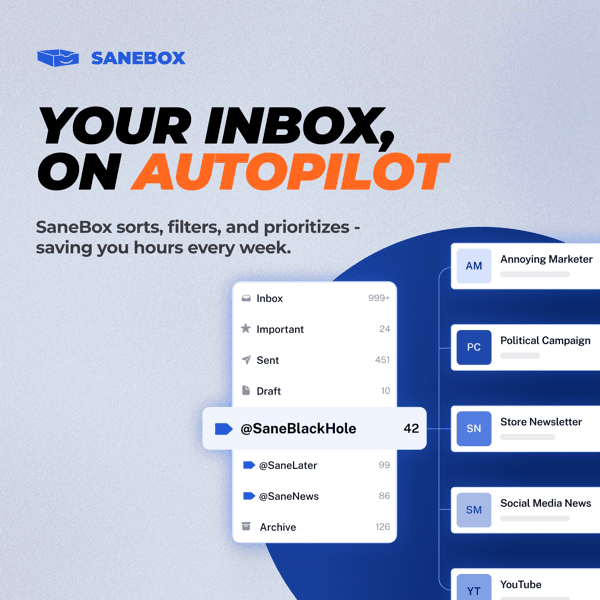
SaneBox is not an email app. It is a service that connects to your existing mailbox and quietly reorganizes it. Its AI learns which senders matter to you and routes everything else out of your inbox into folders you can scan later: SaneLater for low-priority mail, SaneNews for newsletters, and more. Because it works at the server level, the changes show up everywhere you read email, on your phone, laptop, and webmail, without installing anything or changing clients.
It is built for busy professionals, executives, founders, consultants, and anyone drowning in email who wants passive triage rather than a new app to learn. It also has a business tier for teams. It is not for people looking for a free tool, and it is not the right pick if you are happy configuring Gmail filters and Priority Inbox yourself, which cover some of the same ground at no cost.
How We Built This Guide#
This guide is based on SaneBox's official site, its subscription-plans and GDPR help pages, and independent reviews on G2 (4.9/5), Trustpilot (4.8/5), and Capterra (4.8/5). We verified the current Snack/Lunch/Dinner pricing as of June 2026 and noted that some third-party sites list the much lower two-year effective rates as if they were standard monthly prices, which they are not. The privacy and billing points were checked against SaneBox's own documentation and user reviews. This guide also draws on SaneBox's own partner materials, a whitepaper and a one-pager it distributes to resellers, which we treat as vendor marketing rather than independent research and flag explicitly wherever we cite them. All facts were last verified June 2026.
Our sources include:
- SaneBox official site, plans page and GDPR page
- G2, Trustpilot and Capterra user reviews
- Independent comparisons with alternatives
- SaneBox's own partner whitepaper and one-pager
Why SaneBox
Visit provider- SaneLater: The Core FilterThe feature that defines SaneBox.
- Daily DigestOnce a day, SaneBox sends a single summary of everything it filtered, with one-click actions to train it, rescue a message, or bulk-process.
- SaneNews and SaneCCSaneNews consolidates newsletters and bulk mail into one folder, and SaneCC files messages where you are only CC'd or BCC'd.
- Reminders and Follow-ups
- SaneSnooze and SaneBlackHoleSaneSnooze temporarily hides an email and resurfaces it later (for example @SaneTomorrow).
Features in Depth#
SaneLater: The Core Filter#
The feature that defines SaneBox. Mail it judges unimportant is automatically moved from your inbox to a SaneLater folder, leaving only what matters in front of you. The AI learns from how you move mail between folders, so accuracy improves over time.
Daily Digest#
Once a day, SaneBox sends a single summary of everything it filtered, with one-click actions to train it, rescue a message, or bulk-process. This is how you stay on top of filtered mail without living in the SaneLater folder.
SaneNews and SaneCC#
SaneNews consolidates newsletters and bulk mail into one folder, and SaneCC files messages where you are only CC'd or BCC'd. Together they pull two big sources of noise out of the inbox.
Reminders and Follow-ups#
SaneReminders and SaneNoReplies nudge you about emails awaiting a response, including your own sent mail that has gone unanswered, so threads do not silently die.
SaneSnooze and SaneBlackHole#
SaneSnooze temporarily hides an email and resurfaces it later (for example @SaneTomorrow). SaneBlackHole permanently banishes a sender: drag one message in, and you never see that sender again.
SaneAttachments and the Privacy Model#
SaneAttachments offloads large attachments to cloud storage to keep your mailbox lean. Crucially, SaneBox processes only headers and metadata, never the body of your messages, and your mail stays on your own server. For a tool that touches your inbox, that data-minimization model is a genuine reassurance.
Why Not Just Use Gmail or Outlook's Free Filters?#
SaneBox's own whitepaper cites an industry stat that office workers spend an average of 4.1 hours a day checking email, and that roughly half of that time goes to messages that should never have been sent or don't need a reply at all. That figure comes from SaneBox's own partner whitepaper, not from independent research we ran, but it's the case the vendor makes for why passive triage matters in the first place.
On the free-alternative question, SaneBox's own one-pager contrasts its approach with Microsoft's Focused Inbox and Google's Inbox/Priority sorting: SaneBox uses a personalized algorithm that adapts to each user, and moving a single email trains it immediately, while the built-in free tools apply the same global rule set to every user and reportedly need multiple moves before training takes effect, with unclear feedback on when that's happened. SaneBox also works across every email client and device you use, whereas Focused Inbox is Outlook-only and Google's tool works only inside Google's own inbox. That comparison is SaneBox's own framing rather than a test we ran ourselves, but it does explain why "just use Gmail's free filters" isn't quite an apples-to-apples substitute if you switch between clients or providers.
Pros
- Effective, consistent auto-triage; reviewers commonly report 2-4 hours saved per week
- Works with any provider and email client on any device, with nothing to install
- Trainable AI that improves the more you use it
- Privacy-conscious: processes only headers/metadata and never stores your mail
- Outstanding ratings (G2 4.9, Trustpilot 4.8, Capterra 4.8) and frequently praised support
- Powerful extras like SaneBlackHole, reminders and snooze cover the whole triage workflow
Cons
- No free tier, and price is the single most common complaint across review sites
- The best features (SaneAttachments, SaneSnooze) are gated to the $36/month Dinner plan
- Some cancellation and trial-to-paid billing complaints on Capterra; read the terms first
- A learning curve early on, when it can over-filter or misroute mail during training
- Overlaps with capabilities partly available free in Gmail (Priority Inbox) and Outlook
Effectiveness (4.5): Once trained, it reliably keeps the inbox clear. The time savings are real and consistently reported.
Ease of Use (4.4): Setup is quick and it works in your existing client. The only friction is the early training period.
Privacy (4.5): Headers-and-metadata-only processing with mail staying on your server is a strong, unusual privacy posture.
Support (4.6): Frequently singled out as responsive and helpful, which matters for a service touching your inbox.
Value for Money (3.8): Effective, but the no-free-tier model and the $36 gate on top features pull the score down for cost-sensitive users.
Pricing Breakdown#
| Plan | Price | Key Features |
|---|---|---|
| Snack | $7/mo | 1 email account, any 2 features |
| ⭐ Lunch | $12/mo | 2 email accounts, 6 features, Daily Digest |
| Dinner | $36/mo | 4 email accounts, all features incl. Attachments and Snooze |
There is a 14-day free trial (no credit card) but no permanent free plan. Annual billing saves about 20%, and a two-year plan saves around 41%. Education, non-profit, and government users get 25% off.
Snack ($7/month) -- one account and any two features. Fine to test the core filtering, but two features is limiting.
Lunch ($12/month) -- two accounts and six features including the Daily Digest. The plan most individuals will want.
Dinner ($36/month) -- four accounts and all features, including SaneAttachments and SaneSnooze. The jump in price is steep, so only choose it if you specifically need the top features.
Snack
- 1 email account
- Any 2 features
- 14-day trial
Lunch
- 2 email accounts
- 6 features
- Daily Digest
Dinner
- 4 email accounts
- All features
- Attachments & Snooze
Similar Tools Worth Considering#
- Clean Email: The closest alternative, with its own apps for macOS and Android and a bulk-cleaning focus. Choose Clean Email if you want native apps and one-time inbox cleanups, not just ongoing triage.
- Mailstrom: Bulk email processing to clear large backlogs fast. Choose it for a big one-time cleanout rather than continuous filtering.
- Gmail Priority Inbox: The free baseline inside Gmail. Try it first; if its automatic importance sorting is enough, you may not need a paid tool.
- Superhuman: A premium, speed-focused email client (a different category). Choose it if you want a faster way to process mail rather than a filter on your existing client.
For more productivity tools, see our productivity category.
Who Should Use SaneBox?#
Best for high-volume professionals: Executives, founders, and consultants who get hundreds of emails a day get the most from passive, always-on triage.
Best for people who refuse to switch email clients: Because it works at the server level, you keep Gmail, Outlook, or Apple Mail exactly as is and just get a cleaner inbox everywhere.
Best for the privacy-conscious: The headers-only, mail-stays-on-your-server model is reassuring for anyone wary of a tool reading their email.
NOT for you if you want a free tool (there is no free tier), you are comfortable building your own Gmail/Outlook filters, or you need EU data residency (SaneBox runs on US infrastructure and does not advertise EU hosting).
SaneBox does one job and does it very well: it keeps the noise out of your inbox so the important mail stands out. Its ratings are exceptional for a reason, and the privacy model is better than most. The reasons it lands at 4.4 rather than higher are purely commercial: no free tier, a steep top plan, and some billing-terms complaints. Start the 14-day trial, let it learn for a week, and watch the renewal and cancellation terms before you commit.
FAQ#
Is there a free version of SaneBox?#
No. SaneBox offers a 14-day free trial (no credit card) but no permanent free plan. Paid plans start at $7/month (Snack). If you want free email filtering, Gmail's Priority Inbox is the closest no-cost baseline.
Is SaneBox safe and private with my email?#
Yes, and privacy is one of its strengths. SaneBox processes only the headers and metadata of your mail, not the message bodies, and your email stays on your own server rather than being stored by SaneBox. It publishes a GDPR page and offers a DPA for business customers. The main gap for EU users is that it does not advertise EU data residency.
How much does SaneBox cost?#
Snack is $7/month (1 account, 2 features), Lunch is $12/month (2 accounts, 6 features), and Dinner is $36/month (4 accounts, all features). Annual billing saves about 20%. Note that some review sites list much lower numbers that are actually two-year effective rates, not standard monthly prices.
SaneBox vs Clean Email: which should I choose?#
Both manage your inbox without replacing your client. SaneBox focuses on ongoing automatic triage and has a strong privacy model and top ratings. Clean Email offers native apps (macOS, Android) and is stronger for bulk one-time cleanups. For set-and-forget filtering, SaneBox; for hands-on bulk cleaning with apps, Clean Email.
Does SaneBox work with Gmail and Outlook?#
Yes. SaneBox connects to Gmail, Outlook/Microsoft 365, Apple/iCloud, Fastmail, Yahoo, and any IMAP or Exchange account. Because it works at the server level, the sorting appears in whatever client and device you already use, with nothing to install.
